
Architecture
There are five major components of this system:
1) the genotype library
2) the phenotype library
3) the genetic algorithm
4) the automatic evolution engine
5) the interface - which ties all of the other parts together.
Figure 12 illustrates the overall scheme of the Character Evolution Tool, showing each of these components.
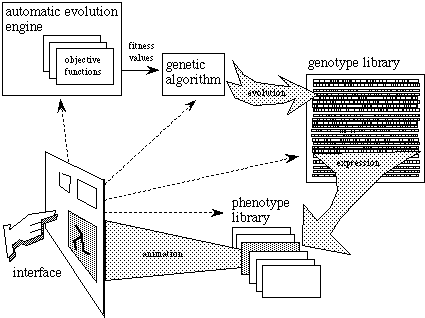
Figure 12 The overall scheme of the Character Evolution Tool. Through the graphical interface (lower left of the illustration), the user has the ability to control many levels of the system.
1) The Genotype Library
A large library of genotypes are held in memory during interaction with this system. This library contains the genotypes for each species, with each species consisting of a maximum population of 100 behavior objects (some smaller subset of the total population is typically active during interaction). Each species' genome can have anywhere from 1 to 50 genes. Genes are stored as floating point numbers ranging from 0.0 to 1.0. These values are interpreted in a variety of ways by the phenotypes as parameters for visual attributes. For instance, a gene specifying the color of an object might be scaled to an integer value ranging from 0 to 255; a gene specifying an amplitude of joint motion might be scaled to a real number value ranging from 0.0 to 90.0, etc. The genotypes in the whole library are initialized as random at the start of the program run. As the user manipulates genes, interactively evolves populations, or initiates automatic evolution, the genotypes are changed accordingly. A population of genotypes for one species can be saved in a file at any time, and previously saved files can be loaded into the library at any time.
2) The Phenotype Library
Associated with each genotype is, of course, a phenotype. Twelve species of phenotypes (behavior objects) have been created and each are loaded into memory at the start of the program run (these were outlined at the beginning of section 4). At any one time, one of these species is displayed on the screen as a population (showing variation). While a species is active, the user can manipulate the genotypes associated with the behavior objects in that species either by tweaking genes directly, interactively evolving, or initiating automatic evolution. In each case, as genotypes are altered, the phenotypes reflect the changes immediately as visual transformations. At any time, the user can switch to another species and work with it for a while and then return to the previous species - the state of the genotypes will remain unchanged, upon switching species.
3) The Genetic Algorithm
The GA is in charge of the basic genetic operators: selection, mutation, and crossover. It is activated when the user selects the "new generation" button after assigning fitness values to favored individuals, or when the automatic evolution engine has completed an evaluation pass - or some mixture of both. To do its thing, the GA requires fitness values supplied by interactive evolution or the automatic evolution engine. This is the only input the GA uses in determining the probabilities for selection of each individual for reproduction.
Selected individuals reproduce via crossover: two selected individuals contribute alternating chunks of their chromosomes to each offspring in the new generation. These chunks can have varying lengths. This is determined by the variable crossover rate: As parental genes are being copied into an offspring chromosome, the source can switch from one parent to the other a number of times. The probability of switching is determined by crossover rate. Crossover rate is computed per species, and is inversely proportional to the species' genotype size.
The setting of mutation rate (interactively controllable) determines the chances of a single gene in a genotype being randomly mutated immediately after reproduction. In mutation, a gene's value can increase or decrease by as much as 1.0 or -1.0, but with higher chances in the 0.0 range. The mutation operator insures against a resulting mutated gene value exceeding the bounds of (0.0, 1.0) by a wrap-around procedure. The mutation rate can affect the amount of variation in the offspring. It can be seenÑin the context of creative design - as a determinant for the amount of automatic experimentation in a population, as it evolves.
4) The Automatic Evolution Engine
Some species of behavior objects come with the ability to evolve according to one or more pre-defined fitness functions. This component essentially allows the fitness functions to kick in and to affect evaluation of the phenotypes automatically. Examples of fitness functions are offered in the section which details the Interface. When the automatic evolution engine is turned on, a biological clock is initialized which has a set duration - at the end of this duration, all the phenotypes are evaluated, ranked by fitness, and mated proportional to ranking. The new generation of phenotypes is automatically created and appears on the screen at the end of the biological clock's period, and the cycle begins again. At any time the user can contribute to the evaluation of the phenotypes via interactive evolution. The user can also set the proportions of multiple fitness functions to guide the direction of evolution.
5) The interface
The interface brings together all the parts of the system and displays a species of behavior objects in multiple windows. Through the interface, the user can interact with the other parts of the system, using a mouse as input device. These interactions include:
* choosing among different species of behavior objects
* changing the size of the population
* initiating automatic evolution
* adjusting the weights of the pre-defined fitness functions
* adjusting the duration of the biological clock for automatic evolution
* adjusting mutation rate
* tweaking genes directly
* resetting the entire population's genotypes to random values
* interactive evolution
* saving and loading genotype files.
The components of interface are described in more detail in the following section.
THE INTERFACE
