
The Interface
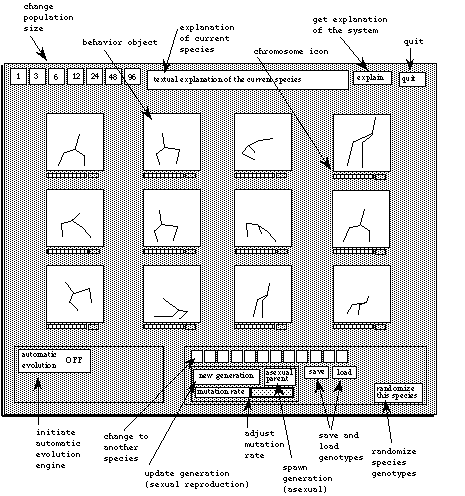
Figure 13 A schematic of the interface. In this depiction, twelve individuals from the simplest articulated figure species are displayed, showing variations among them. Each of the interactive functions are labeled.
Channel Surfing
One can use the interface in a passive mode - just watching a behavior objects do its thing, switching to another species of behavior objects, turning on automatic evolution and watching the results, and reading the explanations which accompany each species. The passive mode is suggested as a way to get to know the system.
Evolving/Gene tweaking
One can also actively change the behavior objects by affecting their genotypes. This can be done on three basic levels:
1) The Watson and Crick Level (Resnick, 94), where the user can open up a genotype and tweak individual genes and directly see their results in the phenotypes
2) The Darwin Level, where the user controls evolutionary processes pertaining to mutation rate, reproduction styles, and fitness criteria
3) The Creator Level, where the user is thinking primarily on the phenotype level, and designing through interactive evolution, gesturing, etc.
These three levels are described below:
1) The Watson and Crick Level
This is the lowest level of control. The user can click on a button at the right of each chromosome icon to "open the hood" and see the gene values represented as rows of slider knobs, which can be interactively adjusted. Changing the value of an individual gene results in real time visual results in the behavior object. For instance, if a gene specifies the length of a limb in an animated character, changing the gene value would result in the limb visually increasing or decreasing in length. Figure 14 shows an example of a behavior object (the fractal tree biomorph) whose genotype has been opened for tweaking.
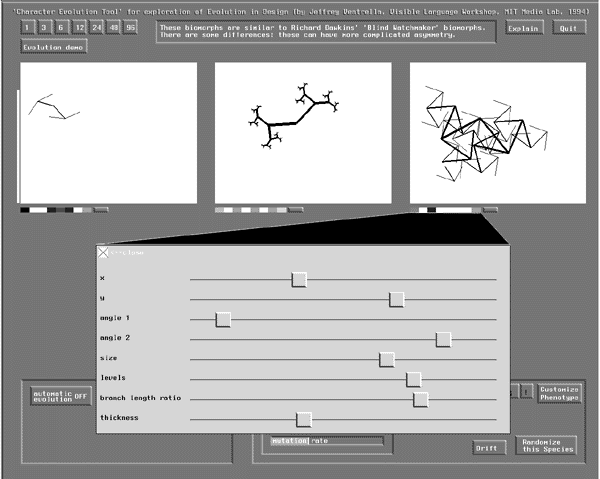
Figure 14 A behavior object's associated genotype can be opened and individual genes can be tweaked. The genes for the species shown (the fractal tree biomorph) are labeled at the left of the genotype panel. They are: X (position) Y (position), (branching) angle 1, (branching) angle 2, size, (fractal) levels, branch length ratio, and thickness (of lines).
At this level one can get to know the particular effects of each gene on the phenotype by interactively adjusting the values and seeing the results in real time. A technique similar to this is described by Oppenheimer (91), who suggests that this kind of isolation of input parameters to a phenotype and the instantaneous feedback from adjusting the parameters affords one the ability to sense the geometry, enhancing intuition about the visual form.
Behavior objects whose genomes are relatively short, such as the tree biomorph (having eight genes) are easy to explore in this mode. Other behavior objects, such as the Vertebrates, have on the order of fifty genes, many of which have indirect effects on the phenotype and cannot be noticed until other genes are changed as well. The Watson and Crick Level becomes problematic in this case - which actually serves a didactic purpose, demonstrating how one cannot easily design form and behavior in high-dimensional search spaces by manipulating isolated parameters. One must move up to a higher level of abstraction, such as the Darwin level.
2) The Darwin Level
On this level, one can utilize the dynamics of Darwinian evolution by turning on the automatic evolution engine and setting up fitness functions. One can also set mutation rate, population size, and the duration of the biological clock's period.
Some of the species come with their own sets of fitness functions. These species can be automatically evolved according to fitness functions and the relative weights associated with multiple fitness functions, if there are more than one. At the end of each evaluation period, the values created by the fitness functions for each individual are added up to determine the final fitness values. A fitness function can contribute a positive (reward) or a negative (penalty) amount to the final fitness.
One example of a species which has a pre-defined fitness function is the fractal tree biomorph species. Its associated fitness function rewards each biomorph according to the degree in which the vertices of the biomorph are distributed in the picture space. This is done by taking the sum of the distances between every point with every other point in the biomorph (if each is within the picture space). This encourages the evolution of shapes in which the branches tend to be space-filling. Figure 15 illustrates four un-evolved biomorphs sampled from a population of twenty-four (shown at top) and one biomorph (shown at bottom) representing the population after this fitness function has affected evolution for twenty generations.
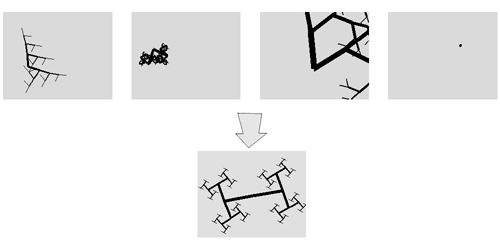
Figure 15 Automatic evolution of space-filling behavior in the fractal tree biomorph
The articulated figure species each come with a set of five fitness functions, the proportional weights of which can be adjusted by the user. Figure 16 shows a close-up of the automatic evolution engine with different settings for weights in each of these fitness functions. Each of these can be adjusted by the user at any time, as well as the biological clock (shown as "evaluate duration." (the other buttons in this panel will be explained below as I discuss their associated functions).
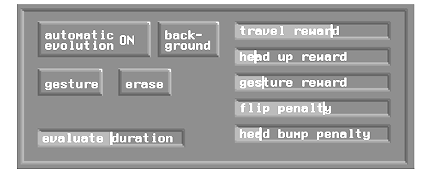
Figure 16 The automatic evolution engine control panel showing fitness functions for the articulated figure species
These fitness functions are:
Travel Reward
The distance between the starting point and the ending point after the evaluation period is used as a positive contribution to overall fitness - this promotes locomotion.
Head up Reward
To encourage more realistic mammal-like (and human-like) morphology and motion
Gesture Reward
When a gesture is drawn into any window, features of this gesture (seen as a space-time object) are compared to features in each of the characters' head motions (another space-time object) better matching of features determines a positive contribution to fitness.
Flip Penalty
The angular velocity of each figure's body is accumulated in a variable during evaluation which is used as a penalty for excessive rotational motion.
Head Bump Penalty
Each time a character's head encounters the ground surface during evaluation, an amount is subtracted from overall fitness
Setting the weights of these functions at differing proportions can affect the direction of evolution in many ways. As stated before, while the automatic evolution engine is running, the user can contribute to evolution at any time by interactively assigning fitness values to individuals, adjusting mutation rate (for more or less experimentation in the population), and changing population size.
Background Evolution
There is a feature that allows the graphical animations to be run in the background (eliminating graphics computations), which speeds up the process considerably. This mode is initialized by selecting the Background button (shown in the illustration above). It is useful before initializing background mode to increase the population size so that the GA will have a larger selection of individuals to work with. While a population is evolving in the background, a time series graph displays the average fitness of the population over the generations so that progress can be monitored. While background mode is on, pressing any mouse button discontinues it and brings the display back to normal. Figure 17 illustrates this graph. It illustrates a frequent effect: average fitness during evolution exhibits sharp increases at irregular intervals. This is caused by chance mutations or crossovers in the population suddenly creating individuals of higher fitness. Artificial life experimenters have similarly observed, in their models, evolutionary stasis interrupted by periods of rapid change. This is compared to the pattern of punctuated equilibria observed in the fossil record (Eldredge and Gould, 72).
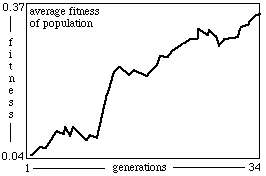
Figure 17 A time series graph is displayed when the user chooses to put the graphics in the background and run automatic evolution without visual display. This graph allows one to monitor the progress of a population.
3) The Creator Level
Very important in this design research is developing user-interface techniques which offer the user (as animator-designer) the ability to think on a high level - an expressive level, and not to be too distracted by the mechanics of Darwinian evolution. The two main features of this system which allow this are the interactive evolution feature and gesturing.
The interactive evolution feature is reminiscent of Richard Dawkins' Blind Watchmaker (86), Karl Sims' interactive evolution system (91), and many other systems recently developed. In a typical interactive evolution system, a collection of images are displayed for the user to peruse, and select favorable examples. A variety of techniques for selection and mating have been explored. The Character Evolution Tool employs an intuitive, flexible reproduction scheme. In Figure 18, a close up of the panel with general controls is shown. On the lower left is the Reproduction area. Here, the user can choose asexual reproduction, create a new generation (for sexual reproduction), or alter the mutation rate.
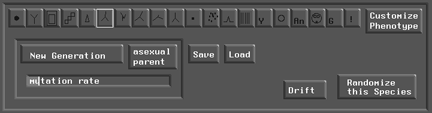
Figure 18 The "genetics" panel of the interface. At the lower left is the Reproduction area, where the user can choose asexual reproduction, create a new generation (for sexual reproduction), and alter the mutation rate.
In my system, two forms of reproduction are possible: asexual and sexual. In asexual reproduction, choosing the asexual tool ("asexual parent" button in the illustration) and then clicking on a specific behavior object's animation window signifies that the behavior object's genotype have offspring with variations, which constitute the next generation. Sexual reproduction is initiated by clicking the "new generation" button. This procedure produces a new generation in which the most fit contribute statistically more genetic material. Assigning fitness is done simply by selecting inside the image - holding the mouse button longer increases the fitness. A "fitness thermometer" at the left of the image visualizes fitness as it is being adjusted. Figure 19 illustrates this feature.
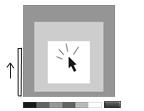
Figure 19 By clicking the mouse cursor into a behavior object's window, one can assign a positive fitness value to that behavior object. Holding the mouse cursor longer causes the fitness to increase. It is visualized at the left of the window in the fitness 'thermometer.' Fitness can not exceed 1.0.
The user can also re-adjust fitness at any time by grabbing the fitness thermometer and lowering the level. The sexual reproduction feature is very flexible. One can assign NO fitness values before selecting the new generation button, in which case all individuals have equal chance of mating for the next generation. Or one can assign a fitness value to only one individual, in which case reproduction is asexual. Or one can assign fitness values to two, three, or any number of individuals, in which case the proportions of fitnesses determine selection for mating. Figure 19.5 illustrates this mechanism.
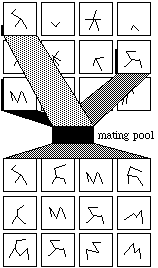
Figure 19.5 In sexual reproduction, any number of individuals from one generation can contribute genetic material to the next generation, through mating. Chances of being selected for mating are proportional to fitness. In this illustration, the more fit individuals are shown with darker paths connecting their associated windows with the mating pool, to indicate the degree in which they contribute genes.
GESTURING
